
Android is one of the most used operating systems among mobile users worldwide. It offers a plethora of apps for multiple tasks. You can also save your contact list on your Android smartphone. Well, at times, we may block a particular phone number/ mobile number on our Android mobile phone if the number spams us through calls or messages. In this article, we will learn how to unblock a phone number on Android.
Unblock a Phone Number on Android
1. Unblock Number from Phone By Google
1. Open your Phone app .
2. Tap More 
3. Tap Settings 
4. Next to the number you want to unblock, tap Clear
You can also unblock numbers directly from the Recents tab of your phone app. Here’s how to unblock a number from your recent call list on an Android phone:
2. Unblock a number from your Recent Call List
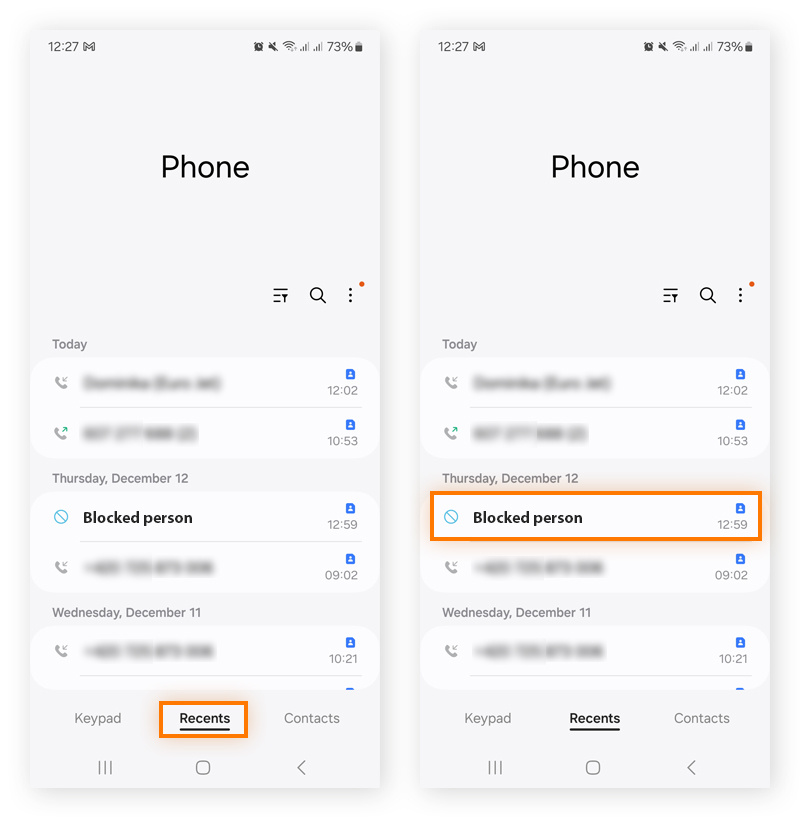
1.Open the phone app on your android mobile phone and click on the Recents tab at the bottom area your phone’s screen.
2. You will see all the dialled, received or missed calls numbers. Just click once on the number you wish to unblock.
3.Click the menu icon at the bottom right.
4. Tap the Unblock option at the bottom of your screen.
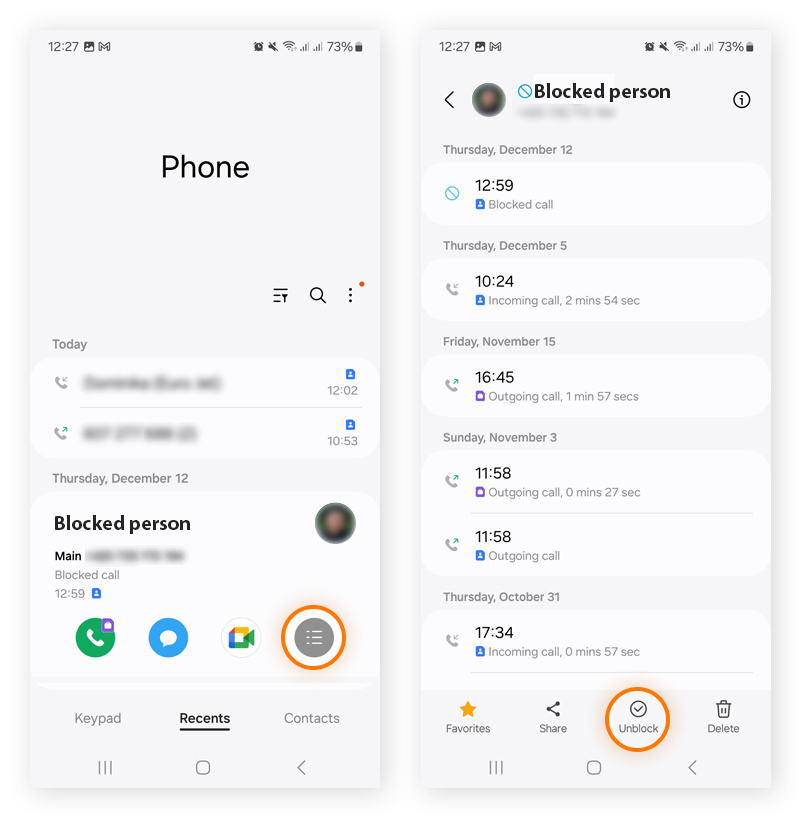
Once you do so you may notice that the Unbloxk icon will automatically change to Block icon. After unblocking the phone number you may start receiving calls and messages from that number again. Great, yeah?
Tip: We advise you not to unblock spam and telemarketing companies’ phone numbers, as you may start getting those irritating spam calls and messages again.
3. Unblock Phone number on Android using Google Contacts
Google Contacts is an app that lets you store all your contacts, including their names and other vital details.
1. Open the Google Contacts app on your mobile phone
2. Now click on the Fix and Manage tab in the bottom right corner of the google contacts app screen.
3. Click on the blocked numbers option.
4. You will see a list of all the blocked numbers on your phone. Some might be blocked by you and some by third-party call management and spam management apps like Truecaller.
5. There is a cross icon adjacent to each blocked number. Just click on the (X) or (–) icon to remove the blocked number from the list.
So, these were the 3 different ways to unblock a phone number on an Android phone. Stay tuned to TechAdvises for more such Android and tech tutorials.


Comments are closed, but trackbacks and pingbacks are open.