

Video consumption is much more than the textual content. Over the past two years, watching shorts and Reels has become a trend among young people. All the tech giants have developed various short video platforms to attract more users and increase their engagement. YouTube Shorts is one such thing. It can be quite addictive. Once you start watching shorts, you forget everything else.
YouTube has now come up with some more AI features. YouTube Shorts’ landscape view is one such AI feature. It lets you watch the Shorts in landscape mode. Let us learn how to watch YouTube Shorts in landscape mode. Let us tell you that this YouTube Shorts Landscape mode feature is currently available for only Google Pixel smartphones. Soon, it will be available for other smartphones.
Also Learn: How to Watch YouTube Videos on Apple Watch
View YouTube Shorts in Landscape Mode
Let us learn how to view the YouTube shorts in landscape mode on your mobile phone.
- Launch the YouTube app on your smartphone.
- Click on the You tab on the bottom bar.

- Look for the gear icon and click on it at the top-right corner to open the Settings menu.

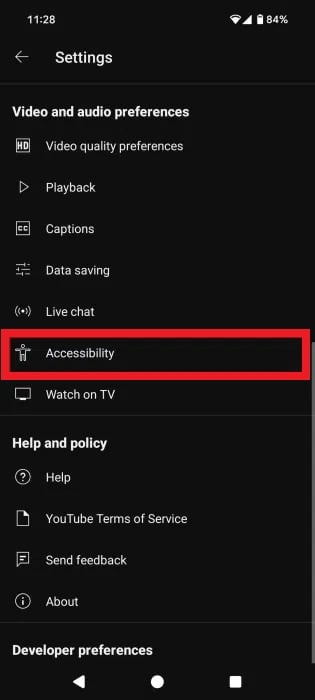
- Now scroll down the cursor and tap on Accessibility option under the Video and audio preferences.
 5. Toggle the Rotate shorts option for watching the Youtube Shorts in landscape mode.


 5. Toggle the Rotate shorts option for watching the Youtube Shorts in landscape mode.
Don’t Miss: How to Reduce Data Usage of Youtube App in Android
6. It’s done. Now you can watch all the YouTube Shorts videos in landscape mode on your mobile phone.
So, these were the steps to watch YouTube Shorts in landscape mode If you have any queries, feel free to ask us through the comments section below. Stay tuned to TechAdvises for more such tech knowledge and YouTube tech tutorials.

